
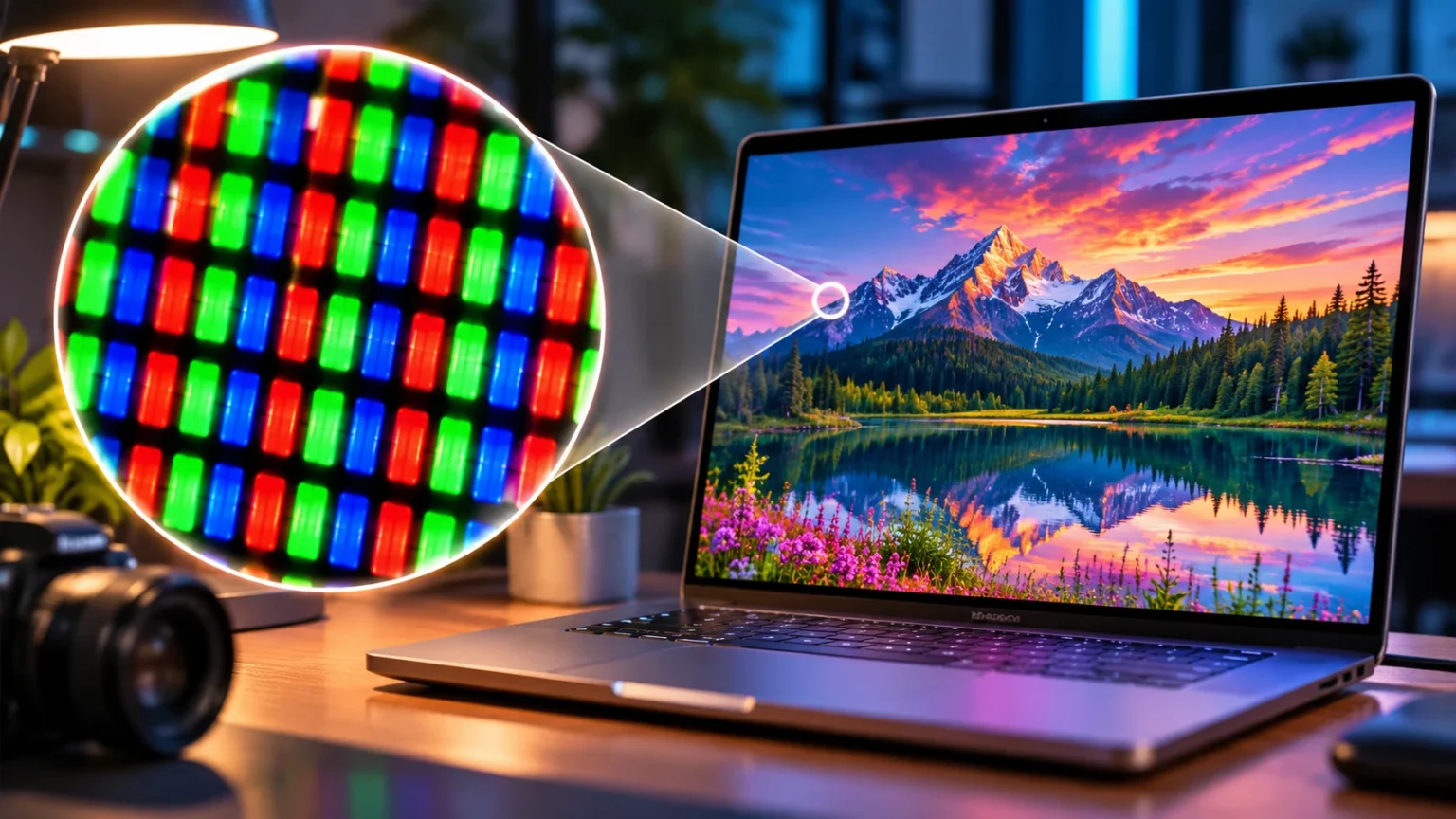

Every image you see on a smartphone, computer monitor, or television is made from tiny picture elements called pixels. These small units work together to display photographs, videos, text, and colorful graphics. Although individual pixels are usually difficult to notice at normal viewing distances, they are essential to digital display technology. Understanding the pixel meaning helps explain how modern screens create detailed visual experiences.
Pixels also play an important role in digital photography, graphic design, gaming, and website development. Their arrangement and color values influence how images appear on different devices. However, concepts such as resolution, pixel density, and image quality can sometimes feel confusing. This guide explains what pixels are, how they work, and why they matter in everyday technology.
What Is a Pixel?
A pixel is the smallest addressable element of a raster image or digital display. The word comes from the expression “picture element,” which describes its role in forming digital pictures. Each pixel represents information about a particular position within an image. When thousands or millions of pixels appear together, they create the photographs, graphics, and text displayed on electronic screens.
The pixel meaning becomes easier to understand when you imagine a digital image as a large grid. Each square in that grid represents a pixel containing color or brightness information. When viewed from a normal distance, the individual squares blend into a complete picture. This arrangement allows digital devices to reproduce detailed images using many small elements.
Pixels exist in different contexts, including image files, computer displays, and camera sensors. Although these technologies use related concepts, their pixels do not always function identically. An image pixel stores digital information, while a display pixel produces visible light through screen hardware. Understanding this distinction helps explain why images can look different across various devices and display technologies.
How Do Pixels Work on a Digital Screen?
Digital screens create images by controlling the light produced or transmitted by individual display pixels. Each pixel contributes a small part of the overall picture. The display system updates these elements according to information received from the device. When the pixels work together, they form moving videos, application interfaces, photographs, and other visual content.
Most color displays use red, green, and blue components to produce different colors. By adjusting the intensity of these components, a screen can create a wide range of visible shades. For example, combining red and green light can produce yellow. Different brightness combinations allow the display to represent many colors within a single image.
The way pixels produce light depends on the screen technology. LCD displays typically use a backlight and liquid crystals to control transmitted light. OLED screens use light-emitting materials that can illuminate individual pixels. These technical differences influence contrast, power consumption, color reproduction, and other characteristics of the viewing experience.
Why Are Pixels Important in Digital Images?
Pixels provide the foundation for representing images in digital form. Every raster photograph, screenshot, and bitmap illustration contains a defined arrangement of pixel values. These values describe how each position should appear when the image is displayed. Without this structure, computers would not be able to represent raster images in the familiar grid-based format.
The number of pixels in an image influences how much spatial detail it can contain. An image with more pixels may preserve finer details than a smaller image captured under similar conditions. However, pixel count alone does not guarantee superior image quality. Lighting, compression, focus, and the original source material also influence the final result.
Pixels are equally important when images are resized, edited, or shared online. Enlarging a small raster image can make individual pixels or interpolation artifacts more noticeable. Reducing image dimensions may remove details that existed in the original file. Understanding these effects helps photographers, designers, and everyday users choose suitable image sizes for different purposes.
What Is Pixel Resolution?
Pixel resolution describes the dimensions of a digital image or display in pixels. It is commonly written as width multiplied by height, such as 1920 × 1080. The first number represents the horizontal pixel count, while the second represents the vertical count. Multiplying them gives the total number of pixels represented within that rectangular area.
For example, a 1920 × 1080 display contains 2,073,600 addressable pixel positions. This resolution is commonly associated with Full HD screens. A 3840 × 2160 display contains 8,294,400 pixels and is commonly called 4K UHD. The higher-resolution display contains four times as many pixels, although perceived sharpness also depends on screen size and viewing distance.
Resolution is important because it affects how much information a display can present. Higher resolutions can support sharper images and more detailed interfaces when appropriate content is available. However, they may also require additional processing power and memory bandwidth. Choosing a display involves balancing resolution with factors such as refresh rate, color accuracy, cost, and practical usage.
Pixel Density and PPI Explained Simply
Pixel density describes how closely pixels are arranged within a physical display area. It is commonly measured in pixels per inch, abbreviated as PPI. A higher PPI indicates that more pixels fit along one inch of the screen. This can make individual pixels harder to distinguish and improve the apparent sharpness of text and images.
Two screens can have the same resolution but different pixel densities. For example, a 1920 × 1080 smartphone-sized display would have a much higher PPI than a large television using the same resolution. The smaller screen packs those pixels into less physical space. Consequently, resolution and pixel density describe related but different aspects of display technology.
Viewing distance also influences how noticeable pixel density becomes. People normally hold smartphones closer to their eyes than televisions, making sharpness requirements different. A display with moderate PPI may appear clear when viewed from several feet away. Understanding this relationship helps explain why higher pixel density is not equally important for every device.
Understanding Pixels vs. Megapixels
A megapixel represents approximately one million pixels. This measurement is commonly used to describe the resolution of digital photographs and camera sensors. For example, an image measuring 4000 × 3000 pixels contains 12 million pixels, or 12 megapixels. The term provides a convenient way to communicate large pixel counts without writing lengthy numbers.
Camera manufacturers often highlight megapixel counts because they indicate potential image resolution. More megapixels can provide additional detail when the lens, sensor, lighting, and processing are capable of capturing it. However, a higher megapixel count does not automatically produce better photographs. Noise performance, dynamic range, focus, and image processing also contribute significantly to photographic quality.
Megapixels are particularly relevant when printing or cropping photographs. A higher-resolution image may allow more cropping while retaining useful detail. It can also support larger prints at a chosen print resolution. Still, the appropriate megapixel count depends on how the photograph will be viewed, edited, printed, or distributed.
How Pixels Create Different Colors
Digital displays commonly use the RGB color model to represent colors through red, green, and blue light. Different intensity values produce different combinations of visible color. When all three components are illuminated strongly and equally, they can produce white light. When their output is reduced or turned off, the resulting appearance becomes darker.
In a common 8-bit-per-channel RGB image, each color channel can represent 256 possible values. Combining three channels allows 16,777,216 possible RGB combinations. This is often described as approximately 16.7 million colors. However, the actual colors displayed depend on the screen’s capabilities, calibration, color gamut, and supporting software.
Color depth influences how many distinct values can be represented for each pixel. Displays and image formats with greater bit depth can support finer gradations under suitable conditions. This can be useful for photography, video production, and professional image editing. Nevertheless, color accuracy also depends on factors beyond the number of available digital values.
Different Types of Pixels in Modern Technology
Image pixels are digital data elements that describe the color or brightness of individual positions within a raster image. They exist in files such as JPEG, PNG, and other bitmap formats. Their size is defined by the image dimensions rather than a fixed physical measurement. The same image can therefore appear at different physical sizes on different screens.
Display pixels are physical elements used to produce the visual output of electronic screens. They often contain multiple subpixels responsible for different color components. The exact arrangement depends on the display technology and panel design. LCD, OLED, and other systems use different methods to control light and reproduce the intended image.
Camera sensor pixels serve another purpose by detecting incoming light during image capture. These photosensitive sites convert light into electrical signals that can be processed into digital image information. Their performance depends on sensor architecture, exposure conditions, and processing methods. Although camera pixels and display pixels are connected through the imaging process, they perform different functions.
What Are Subpixels and Why Do They Matter?
Subpixels are smaller components within many display pixels that contribute individual color information. A common arrangement uses separate red, green, and blue subpixels. By controlling their light output, the display creates the intended color for the complete pixel. These components are essential to how many modern screens reproduce colorful images and readable text.
Different display manufacturers may use different subpixel arrangements. Some screens employ traditional RGB stripe layouts, while others use alternative structures. These arrangements can influence perceived sharpness, text rendering, and color reproduction. The effects depend on display resolution, operating system rendering techniques, and the particular panel technology used.
Subpixels are usually too small to distinguish during normal viewing. However, they may become visible under strong magnification or in close-up display photographs. Their arrangement helps explain why two screens with similar specifications can appear slightly different. Understanding subpixels provides a deeper view of how digital displays transform electronic signals into visible images.
What Is Pixelation and Why Does It Happen?
Pixelation occurs when individual pixels or block-like image structures become noticeably visible. It often happens when a low-resolution image is enlarged beyond the detail available in its original file. The result may appear blocky, with visible square regions instead of smooth edges. Pixelation is particularly noticeable around fine text, diagonal lines, and detailed photographic subjects.
Image compression can also produce blocky visual artifacts that resemble pixelation. Highly compressed photographs and videos may lose fine detail or develop visible boundaries between image regions. These problems can become more noticeable when the content is enlarged. However, compression artifacts and visible individual pixels are technically different phenomena, even though people sometimes describe both as pixelation.
To reduce unwanted pixelation, start with an image that has sufficient resolution for its intended use. Avoid repeatedly enlarging small raster files or applying excessive compression. When creating graphics that need frequent resizing, vector formats may offer an advantage. These files describe shapes mathematically rather than relying entirely on a fixed pixel grid.
Pixels in Smartphones, Computers, and Televisions
Smartphones typically use relatively high pixel densities because their screens are viewed from short distances. This helps keep small text, icons, and photographs visually clear. Screen resolution varies among devices, and higher specifications may improve detail under suitable conditions. However, brightness, contrast, color accuracy, and display quality also influence the overall experience.
Computer monitors use pixels to display applications, documents, games, and creative projects. Resolution affects how much desktop content can fit within the available display space. Higher-resolution monitors may support detailed images and sharper interface elements. Operating system scaling can make text and controls easier to read without requiring users to operate everything at its native pixel size.
Televisions generally have larger physical screens and longer typical viewing distances. Common modern resolutions include Full HD and 4K UHD, with higher-resolution models also available. The value of additional pixels depends partly on screen size and content quality. A well-designed viewing setup considers resolution alongside brightness, contrast, motion handling, and viewing distance.
How Pixels Affect Gaming and Video Quality
Pixels play an important role in how video games appear on a display. Higher rendering resolutions can improve the visibility of fine details and reduce certain jagged edges. However, producing more pixels requires additional graphics processing resources. Players often balance resolution with frame rate, visual effects, and responsiveness to achieve their preferred gaming experience.
Video resolution also affects the amount of image detail that can be represented. A 4K video contains more pixel positions per frame than a Full HD video. However, the actual viewing quality depends on compression, bitrate, source quality, and display characteristics. Higher-resolution content is not automatically superior when the underlying recording or encoding is poor.
Pixel response behavior can influence how moving images appear on screens. Response time describes how quickly display pixels transition between specified states, while refresh rate describes how frequently the screen updates. These measurements represent different characteristics. Together with processing and motion handling, they can affect perceived clarity during fast-moving scenes and interactive applications.
Pixels in Website Design and Digital Graphics
Pixels are important in website development because they help define image dimensions and many layout measurements. Designers use pixel-based values when preparing photographs, icons, and interface assets. However, web layouts also rely on responsive units such as percentages, rem, and viewport measurements. These approaches help websites adapt to different screen sizes and viewing environments.
A CSS pixel is not always equivalent to one physical display pixel. Browsers use CSS pixels as logical measurement units, while device pixel ratio describes their relationship to physical screen pixels. High-density displays may use multiple physical pixels to render one CSS pixel. This distinction is important when creating sharp website images and responsive interfaces.
Image optimization also depends on understanding pixels. Oversized image files can increase page loading times without providing noticeable visual benefits. Images with insufficient dimensions may appear blurry when displayed too large. Selecting appropriate image dimensions, compression settings, and responsive image formats helps create websites that balance visual clarity with loading performance.
How to Choose the Right Pixel Resolution
Choosing an appropriate resolution begins with understanding how the image or display will be used. For everyday browsing, reading, and general productivity, many modern resolutions provide comfortable viewing experiences. Professional photography, detailed design work, and certain gaming activities may benefit from additional pixels. However, higher resolution should not be the only factor influencing a purchasing decision.
When selecting image dimensions, consider the intended display area and whether the image may need cropping or enlargement. A small website thumbnail does not require the same dimensions as a large printed photograph. Providing suitable resolution helps preserve clarity without unnecessary file size. Maintaining the original aspect ratio also prevents unwanted stretching or distortion.
For physical displays, evaluate screen size, viewing distance, and content requirements together. A high-resolution screen may provide limited visible benefits if viewed from far away. Conversely, a larger monitor used for detailed work may benefit from additional pixels. Comparing complete display specifications helps identify a suitable balance between image quality, performance, and cost.
Conclusion
The pixel meaning refers to the individual picture elements that form raster images and digital displays. These tiny units represent image information and work together to create photographs, videos, graphics, and text. Understanding pixels provides a foundation for learning about resolution, digital photography, screen technology, and visual quality.
Pixel count, pixel density, color depth, and subpixel arrangements all influence different aspects of digital imaging. However, image quality depends on more than the number of pixels available. Display technology, processing, viewing distance, and source content also play important roles. Knowing these differences makes technical specifications easier to interpret.
Whether you are choosing a smartphone, editing photographs, designing websites, or comparing televisions, understanding pixels can support better decisions. Focus on the specifications that matter for your intended use rather than assuming bigger numbers always produce better results. Pixels may be tiny, but their combined contribution makes modern digital visuals possible.
Frequently Asked Questions
What is the simple meaning of a pixel?
A pixel is the smallest addressable element of a raster image or digital display. Many pixels work together to create visible pictures, text, videos, and graphics on electronic devices.
What does 1920 × 1080 pixels mean?
1920 × 1080 describes an image or display containing 1,920 horizontal pixels and 1,080 vertical pixels. This equals 2,073,600 pixels in total and is commonly known as Full HD resolution.
Are more pixels always better for image quality?
No, more pixels can provide additional detail, but they do not guarantee better image quality. Lighting, image processing, compression, display technology, and viewing conditions also influence how clear an image appears.
What is the difference between pixels and megapixels?
A pixel represents one picture element, while a megapixel represents approximately one million pixels. Megapixels are commonly used to describe camera sensor resolution and the dimensions of digital photographs.
Can the human eye see individual pixels?
Yes, individual pixels can become visible when a screen has low pixel density or is viewed very closely. Their visibility depends on display size, resolution, viewing distance, and individual eyesight.