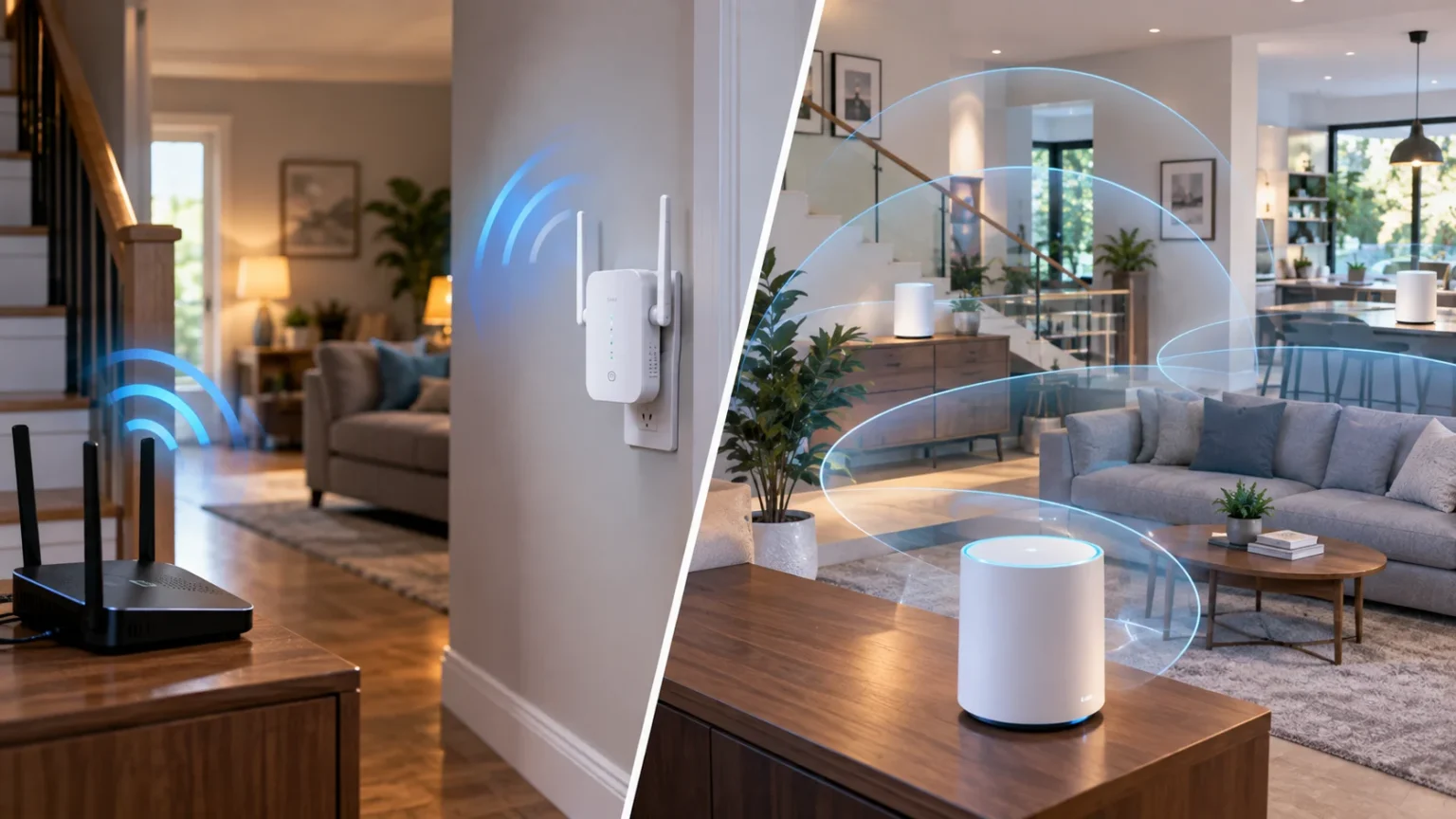

Weak Wi-Fi in bedrooms, upstairs rooms, garages, or home offices is a common problem, especially when one router has to cover a large property. Two popular solutions are Wi-Fi extenders and mesh Wi-Fi systems. Both can improve wireless coverage, but they work differently and are better suited to different situations.
Understanding the Wi-Fi extender vs mesh Wi-Fi difference can help you avoid spending money on hardware that does not solve your actual problem. The right choice depends on your home size, internet speed, number of devices, budget, and how smoothly you want devices to move between different areas.
What Is a Wi-Fi Extender?
A Wi-Fi extender is a device designed to receive the wireless signal from your existing router and rebroadcast it into an area where coverage is weak. It is often placed somewhere between the router and the dead zone. The extender gives your devices another nearby source of Wi-Fi without replacing your existing router.
Some extenders create a separate network name, while newer models may support technologies that make network switching less noticeable. Even so, an extender generally operates as an addition to your main router rather than as part of one fully coordinated system. Its performance depends heavily on the quality of the signal it receives.
Wi-Fi extenders are popular because they are relatively inexpensive and simple to install. If you only have one room with poor reception, an extender may provide an easy solution. However, using several extenders around a large house can become harder to manage and may produce inconsistent results.
What Is a Mesh Wi-Fi System?
A mesh Wi-Fi system uses multiple units, often called nodes or points, to create one coordinated wireless network across a property. One unit connects to your modem or internet gateway, while additional nodes are positioned throughout the home. Together, they provide wider coverage than a single traditional router.
Unlike basic extenders, mesh nodes are designed to communicate with each other as part of the same network. Your phone, laptop, or tablet can move between different areas while remaining connected to the same Wi-Fi name. The system determines which node should provide the best connection based on location and network conditions.
Mesh Wi-Fi is especially useful in larger homes, multi-story properties, or houses with several Wi-Fi dead zones. Most modern systems are managed through a mobile app and can make setup relatively simple. The main drawback is that a complete mesh system generally costs more than buying a single extender.
Wi-Fi Extender vs Mesh Wi-Fi: Main Difference
The biggest difference is how the devices manage wireless coverage. A Wi-Fi extender takes an existing signal and repeats it into another area. A mesh system creates a coordinated network using several access points that are designed from the beginning to work together throughout the property.
With an extender, your device may sometimes remain connected to a weaker router signal even when you are standing closer to the extender. Depending on the equipment, you might also need to manually switch networks. Mesh systems usually handle roaming more intelligently, allowing compatible devices to move between nodes with less interruption.
This difference becomes more noticeable as the size of the property increases. A single extender may be enough for one troublesome bedroom or office. If several floors or distant rooms need stronger Wi-Fi, a mesh system often provides a cleaner and more manageable whole-home solution.
Which Provides Better Wi-Fi Coverage?
Mesh Wi-Fi generally provides better coverage across large areas because you can place several coordinated nodes throughout the property. Each node helps extend the network into nearby rooms while remaining connected to the rest of the system. This makes mesh useful for large homes, unusual layouts, or multiple floors.
An extender works best when the coverage problem is relatively small. For example, if your router reaches most of your home but struggles with one bedroom, an extender placed in the correct position may solve the issue. Installing it too far from the main router, however, means it may repeat an already weak signal.
Coverage also depends on obstacles rather than square footage alone. Concrete walls, metal structures, thick floors, large appliances, and neighboring wireless networks can all affect Wi-Fi range. In difficult environments, adding intelligently positioned mesh nodes gives you more flexibility than depending on one router and one extender.
Wi-Fi Extender vs Mesh Wi-Fi for Speed
A Wi-Fi extender can reduce effective speeds, especially when it uses the same wireless band to communicate with the router and your devices. Data may need to travel through an additional wireless step before reaching the main router. This does not automatically make extenders slow, but the connection quality between devices matters considerably.
Modern mesh systems can manage this communication more efficiently, particularly when they include dedicated backhaul capacity or support newer Wi-Fi standards. Premium systems may use multiple bands to handle communication between mesh nodes and connected devices. Wired Ethernet backhaul can improve performance even further by connecting nodes through cables.
However, mesh Wi-Fi cannot make your internet plan faster than the speed provided by your internet service provider. A faster mesh system mainly helps distribute available bandwidth more efficiently throughout the house. Your final speed also depends on your device, network congestion, node distance, and Wi-Fi technology.
Which Is Better for Seamless Roaming?
Mesh Wi-Fi has a clear advantage when you frequently move around your home with connected devices. Because the nodes operate as one coordinated network, your phone or laptop can usually switch to a stronger node without requiring manual network changes. This is useful during video calls, streaming, and other continuous activities.
Traditional extenders may create a second network with a slightly different name, such as adding “EXT” to the original Wi-Fi name. Your phone can sometimes remain connected to the original router even when its signal becomes weak. You may need to disconnect manually before the device chooses the stronger network.
Some modern extenders support improved roaming features, particularly when paired with compatible routers. Even then, a purpose-built mesh platform usually provides a more consistent experience throughout a larger house. If seamless movement between rooms matters to you, mesh networking is generally the more convenient architecture.
Setup and Network Management Compared
Wi-Fi extenders are usually quick to install. Many can connect to an existing router through a setup app, web interface, or WPS button. Once connected, you mainly need to find a location where the extender receives a strong enough signal while still reaching the area that previously had poor coverage.
Mesh systems require replacing or reorganizing more of your wireless setup, but manufacturers have made the process much easier. Most systems guide you through connecting the main unit and adding additional nodes through an app. You can then manage connected devices, guest networks, security options, and parental features from one central interface.
It is also useful to understand how different networking devices provide wireless connectivity. An access point connects devices to a network in a slightly different way from a simple repeater. Knowing these differences can help when deciding between extenders, mesh nodes, and wired networking solutions.
Which Option Is Better for Large Homes?
Mesh Wi-Fi is usually the more practical option for large homes because coverage can be distributed across several strategically positioned nodes. A three-story home may have one unit downstairs, another on the middle floor, and another upstairs. This creates multiple strong wireless zones while keeping them under one network.
Trying to achieve the same result with several independent extenders can become complicated. Each extender needs a reliable connection to the router or another suitable source, and roaming behavior may become inconsistent. Managing several network names or troubleshooting multiple repeaters can also become frustrating when something stops working correctly.
That does not mean every large house automatically needs expensive mesh equipment. If Ethernet cables already run throughout the property, wired access points can provide another strong solution. For most people who want simple whole-home wireless coverage without complicated networking knowledge, however, mesh is generally easier to manage.
Which Option Is Better for Small Homes?
A Wi-Fi extender often makes more financial sense in a small home or apartment where the router already covers most rooms. If one distant corner receives an unreliable signal, spending money on a complete mesh system may be unnecessary. One well-positioned extender can often solve a limited coverage issue.
Small homes may also benefit from simply repositioning the existing router before buying any additional equipment. Placing it in a central, elevated, open location can significantly improve coverage. Moving the router away from cabinets, thick walls, televisions, and other electronics may eliminate the weak area without adding another device.
Mesh Wi-Fi can still be worthwhile in smaller properties when you have many connected devices or want easier network management. It may also make sense if you expect to move into a larger property later. For basic coverage problems, however, an extender is typically the more economical starting point.
Wi-Fi Extender vs Mesh Wi-Fi for Gaming and Streaming
Gaming and high-resolution streaming depend on more than signal strength. Latency, connection stability, congestion, and available bandwidth can all affect performance. A poorly positioned extender may show a strong Wi-Fi icon while still delivering inconsistent speeds because its connection back to the main router is weak.
A good mesh system can provide a more stable connection when consoles, televisions, and computers are located far from the primary router. Systems with Ethernet ports can also allow you to connect certain devices directly to nearby mesh nodes. Wired backhaul between nodes can further improve consistency where Ethernet installation is available.
Serious competitive gamers may still prefer a direct Ethernet connection whenever possible because wired connections generally offer predictable latency and stability. For everyday gaming and streaming across several rooms, mesh Wi-Fi provides more flexibility. Extenders remain suitable when only one entertainment area needs a modest improvement in signal.
Cost: Which One Offers Better Value?
Wi-Fi extenders are usually the cheaper option because you are buying one additional device instead of a complete networking system. Basic models can provide an affordable solution when the existing router works well everywhere except one small area. This makes them appealing when budget is your highest priority.
Mesh Wi-Fi systems cost more because they typically include two or three coordinated units and more advanced management technology. High-end mesh kits with Wi-Fi 6E or Wi-Fi 7 can become particularly expensive. The extra cost may be worthwhile when it solves several dead zones and removes the need for separate extenders.
Value should therefore be measured by the problem you need to solve rather than purchase price alone. Paying less for multiple extenders that still provide inconsistent coverage may not save money in the long term. Likewise, buying a premium mesh system for one weak bedroom may be unnecessary overkill.
How to Choose Between a Wi-Fi Extender and Mesh Wi-Fi
Choose a Wi-Fi extender when your current router performs well in most of your property and only one nearby location needs better coverage. It is also appropriate when your budget is limited and you do not require sophisticated roaming. Start with one extender and position it before the signal becomes extremely weak.
Choose mesh Wi-Fi when your home contains several weak areas, multiple floors, or many connected devices. Mesh is also better suited to households where people regularly move between rooms while using video calls, streaming services, or mobile devices. Centralized management makes troubleshooting and network control easier as well.
Before buying either option, test your existing network in different rooms and identify exactly where performance drops. Consider your internet speed, building layout, number of devices, and whether Ethernet wiring is available. Matching the solution to your actual network problem is more useful than simply buying the newest hardware.
Conclusion
The Wi-Fi extender vs mesh Wi-Fi choice mainly depends on how much coverage you need. A Wi-Fi extender is affordable, simple, and suitable for fixing one relatively small dead zone. Mesh Wi-Fi is designed for broader coverage and provides a more coordinated experience across multiple rooms and floors.
For small homes with one weak area, an extender can offer excellent value without requiring you to replace your current router. For larger homes, multiple dead zones, heavy device usage, or seamless roaming, a mesh system usually provides a more convenient network structure. Better management can also make future expansion easier.
Neither option is automatically right for every household. Examine your current coverage, internet plan, budget, property size, and device requirements before deciding. A properly positioned extender can solve a simple problem effectively, while a well-designed mesh network is usually better when reliable whole-home Wi-Fi is the goal.
FAQs
Is mesh Wi-Fi better than a Wi-Fi extender?
Mesh Wi-Fi is generally better for whole-home coverage and seamless roaming. A Wi-Fi extender can be the better-value option when you only need to improve coverage in one small area.
Does a Wi-Fi extender make internet slower?
An extender can reduce effective speeds because wireless data may need an extra step to reach the router. Performance depends heavily on extender placement, signal quality, and the technology used.
Can I use a Wi-Fi extender with a mesh system?
Sometimes, but it may not integrate smoothly with the mesh network’s roaming and management features. Adding another compatible mesh node is usually a cleaner way to expand an existing mesh system.
Is mesh Wi-Fi worth it for a two-story house?
It can be, particularly if your router struggles to provide reliable coverage across both floors. A two- or three-node mesh system can distribute stronger Wi-Fi more evenly throughout the property.
Should I replace my router with mesh Wi-Fi?
Consider replacing it when you have several dead zones, unreliable roaming, or a large property. If your existing router performs well except in one room, an extender may be sufficient.